﻿---
title: 如何刪除 WPORT 職航站帳號（App 與網頁版）
description: WPORT 職航站求職者帳號刪除教學：在 App（iOS、Android）或網頁版都能自行申請刪除帳號。名下若還擁有公司，需先移轉或刪除公司帳號。
publishDate: 2026-10-13
tags:
  - WPORT 功能
cover: "https://res.cloudinary.com/dyebbsckc/image/upload/f_auto,q_auto:good,w_1200,c_limit/v1791876909/wport-blog/delete-account-cover.jpg"
---

本頁說明如何刪除你的 **WPORT 職航站**帳號。適用 WPORT 職航站 App（iOS、Android）與網站 wport.me 的求職者帳號，兩邊刪除的是同一個帳號，任選一種方式即可。

刪除後，你的個人資料、履歷、應徵紀錄與收藏都會一併刪除，**無法復原**。

## 刪除前請先確認：名下是否還擁有公司

如果你的帳號同時是某間公司的擁有者，**請先移轉公司帳號給其他成員，或先刪除公司**，才能刪除個人帳號。

## 在 App 刪除帳號（iOS、Android）

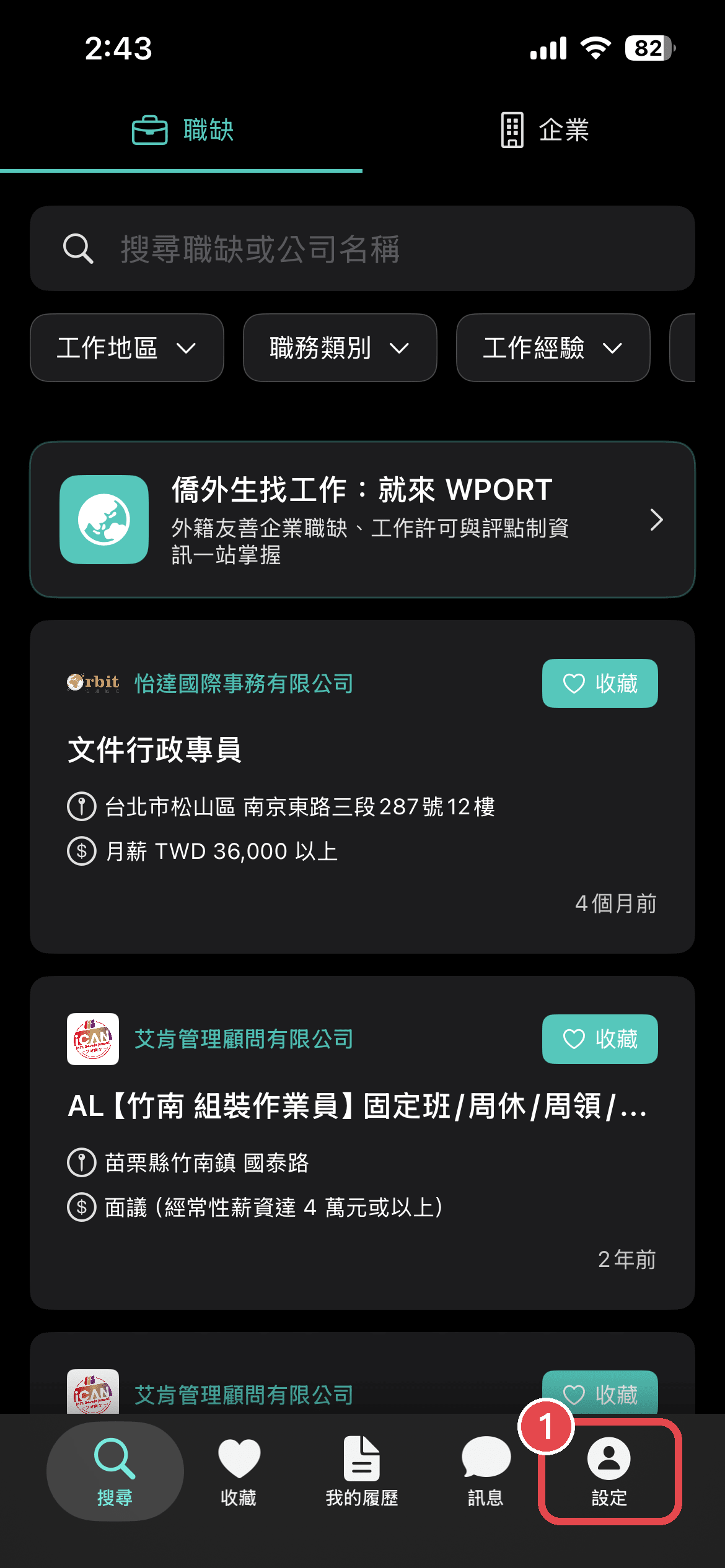
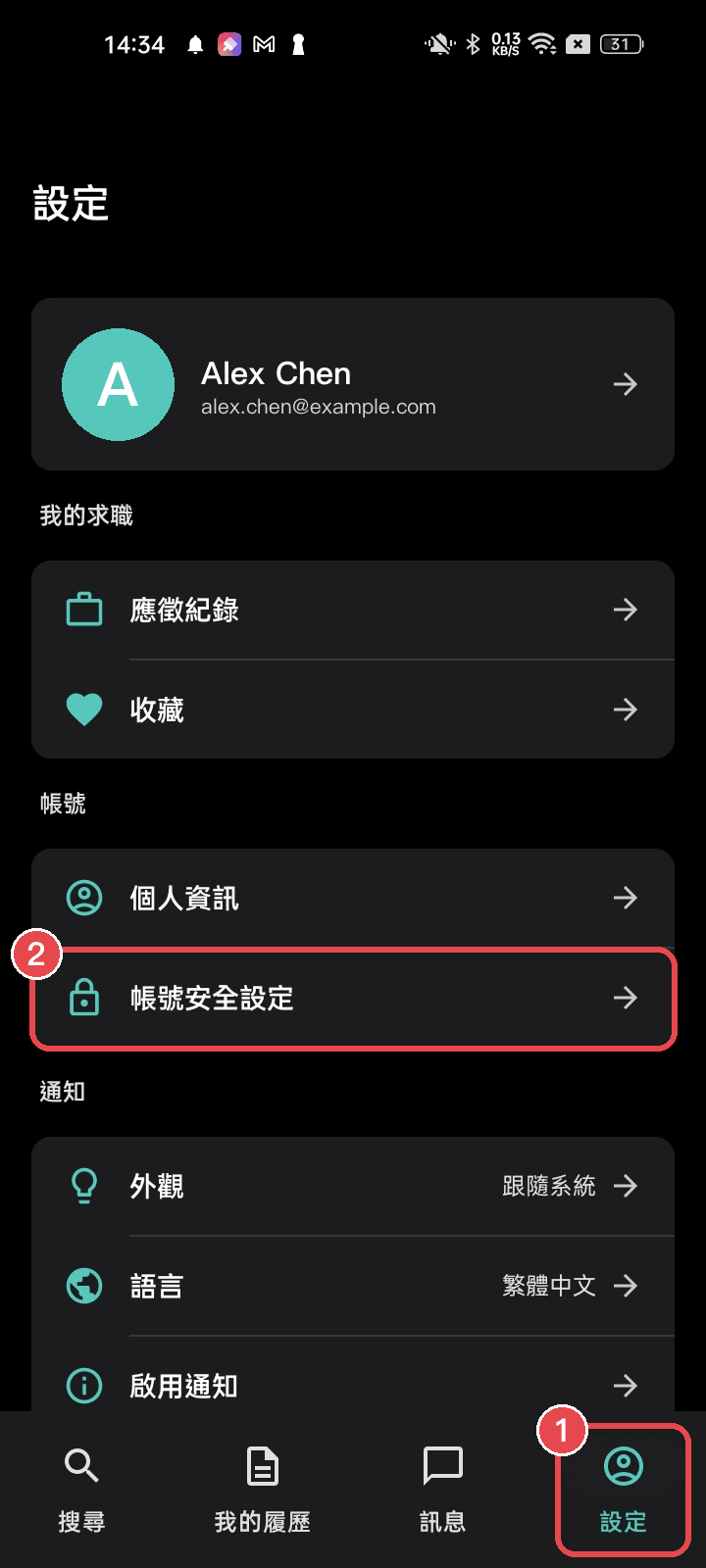
1. 登入後，點選右下角的「**設定**」圖示
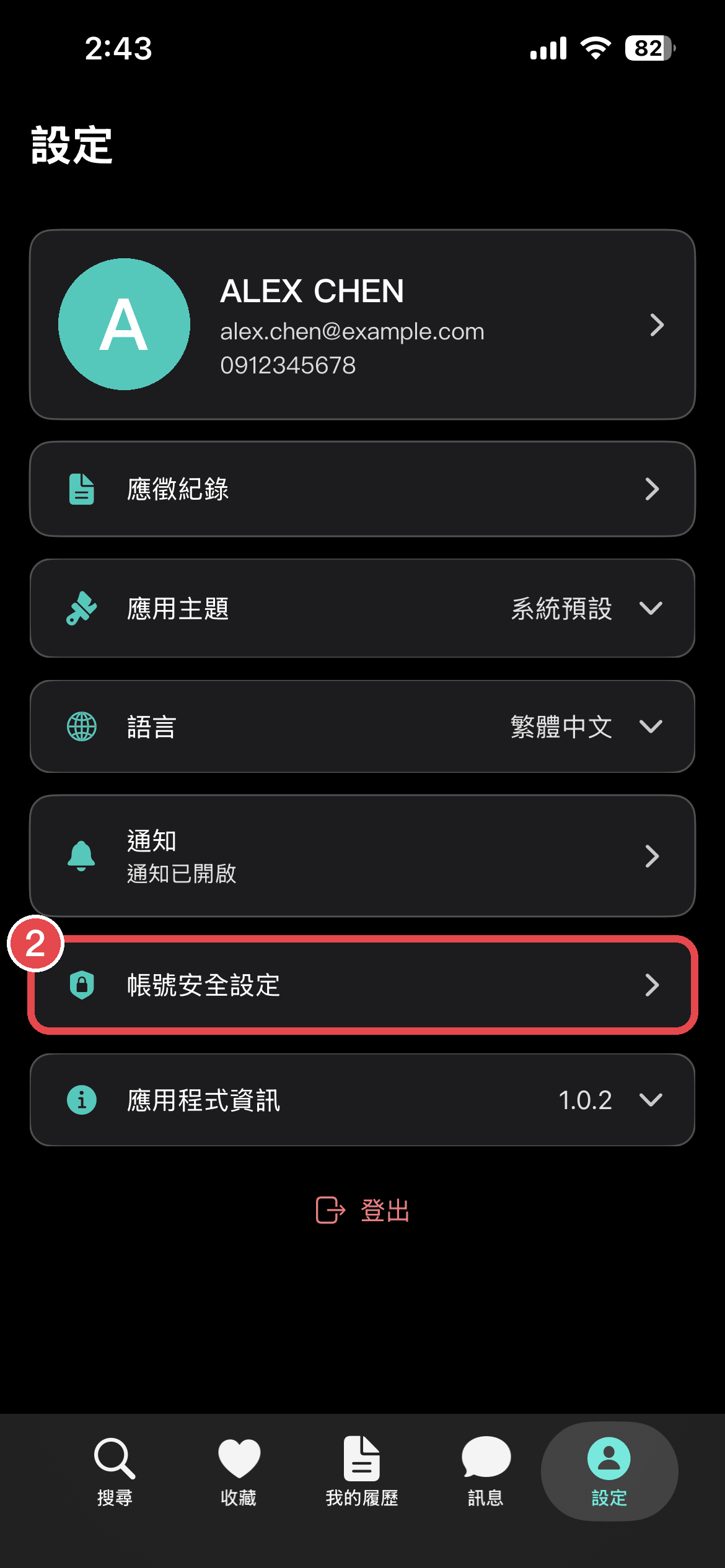
2. 點選「**帳號安全設定**」
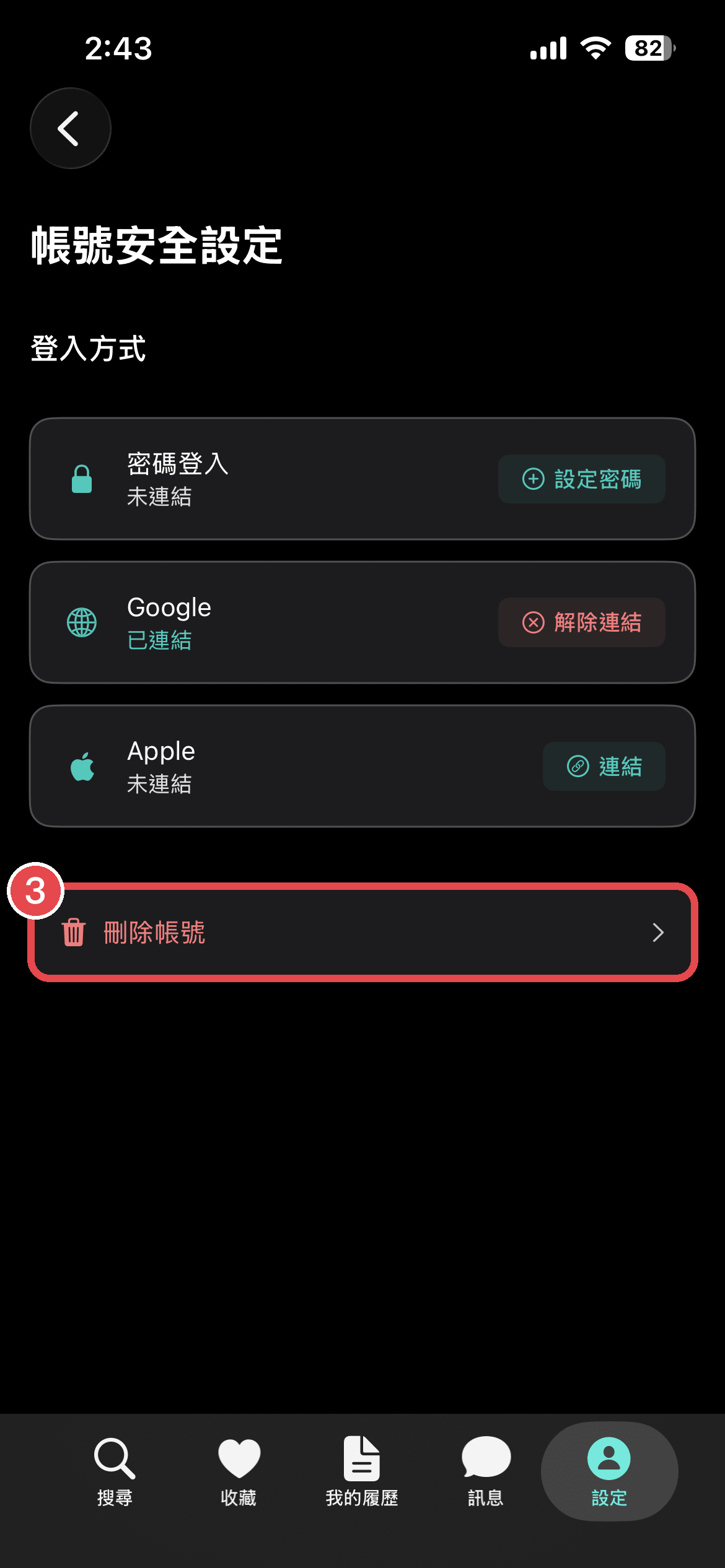
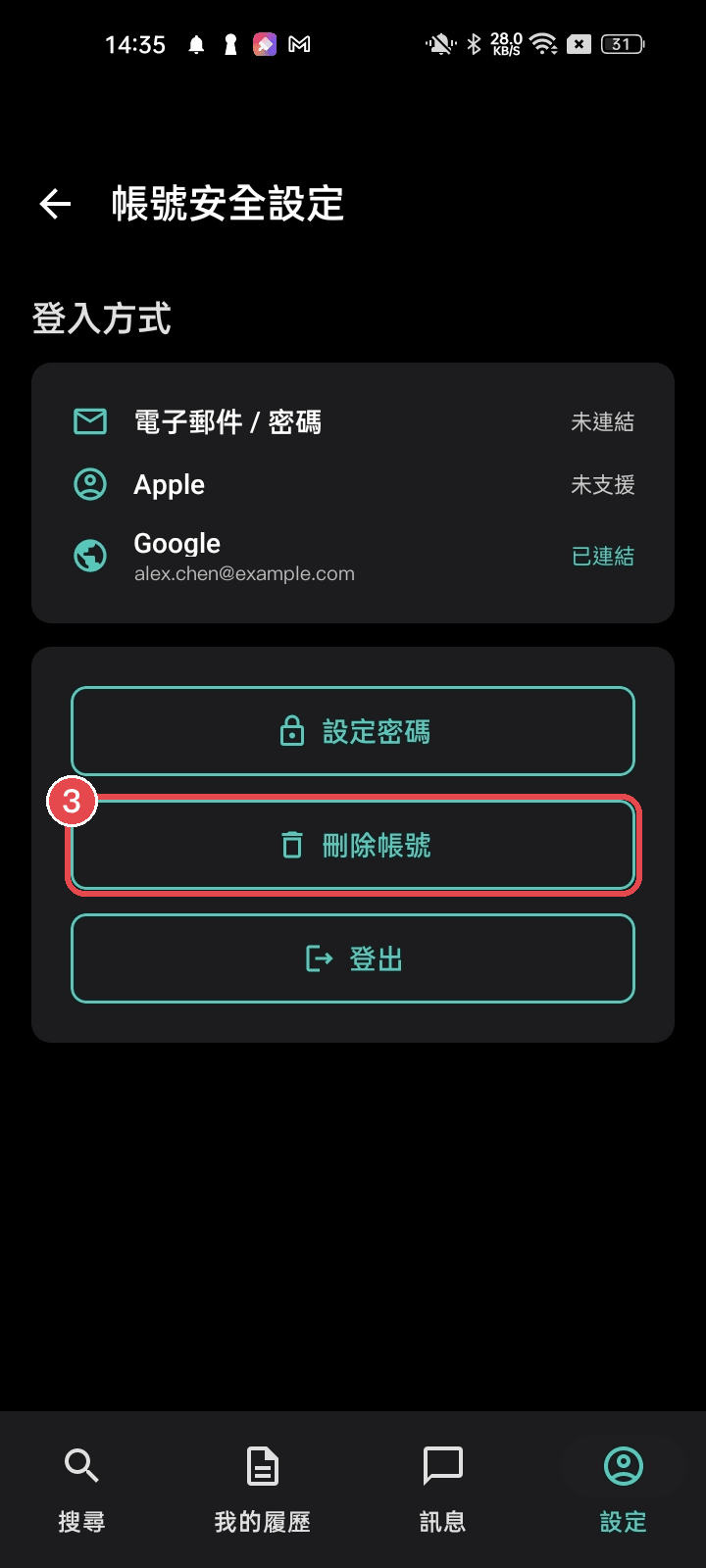
3. 點選「**刪除帳號**」，依畫面指示完成確認

> 點圖片可以放大看。紅框是要點的位置，數字對應上面的步驟。

### iOS

<div class="not-prose grid grid-cols-3 gap-3 my-6">
  <figure class="m-0">
    <img src="https://res.cloudinary.com/dyebbsckc/image/upload/f_auto,q_auto:good,w_1200,c_limit/wport-blog/delete-account-ios-1-home.png" alt="① 點右下角「設定」" loading="lazy" class="rounded-lg" />
    <figcaption class="mt-2 text-center text-sm">① 點右下角「設定」</figcaption>
  </figure>
  <figure class="m-0">
    <img src="https://res.cloudinary.com/dyebbsckc/image/upload/f_auto,q_auto:good,w_1200,c_limit/wport-blog/delete-account-ios-2-settings.png" alt="② 點「帳號安全設定」" loading="lazy" class="rounded-lg" />
    <figcaption class="mt-2 text-center text-sm">② 點「帳號安全設定」</figcaption>
  </figure>
  <figure class="m-0">
    <img src="https://res.cloudinary.com/dyebbsckc/image/upload/f_auto,q_auto:good,w_1200,c_limit/wport-blog/delete-account-ios-3-security.png" alt="③ 點「刪除帳號」" loading="lazy" class="rounded-lg" />
    <figcaption class="mt-2 text-center text-sm">③ 點「刪除帳號」</figcaption>
  </figure>
</div>

### Android

<div class="not-prose grid grid-cols-3 gap-3 my-6">
  <figure class="m-0">
    <img src="https://res.cloudinary.com/dyebbsckc/image/upload/f_auto,q_auto:good,w_1200,c_limit/wport-blog/delete-account-android-1-settings.png" alt="① 點右下角「設定」 ② 點「帳號安全設定」" loading="lazy" class="rounded-lg" />
    <figcaption class="mt-2 text-center text-sm">① 點右下角「設定」 ② 點「帳號安全設定」</figcaption>
  </figure>
  <figure class="m-0">
    <img src="https://res.cloudinary.com/dyebbsckc/image/upload/f_auto,q_auto:good,w_1200,c_limit/wport-blog/delete-account-android-2-security.png" alt="③ 點「刪除帳號」" loading="lazy" class="rounded-lg" />
    <figcaption class="mt-2 text-center text-sm">③ 點「刪除帳號」</figcaption>
  </figure>
</div>

## 在網頁版刪除帳號

1. 登入 [wport.me](https://wport.me) 後，點選右上角的**大頭照**
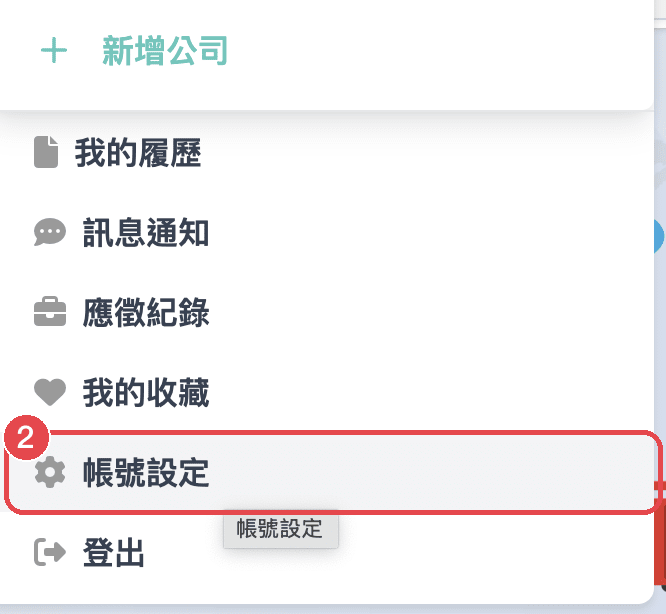
2. 在下拉選單中選擇「**帳號設定**」
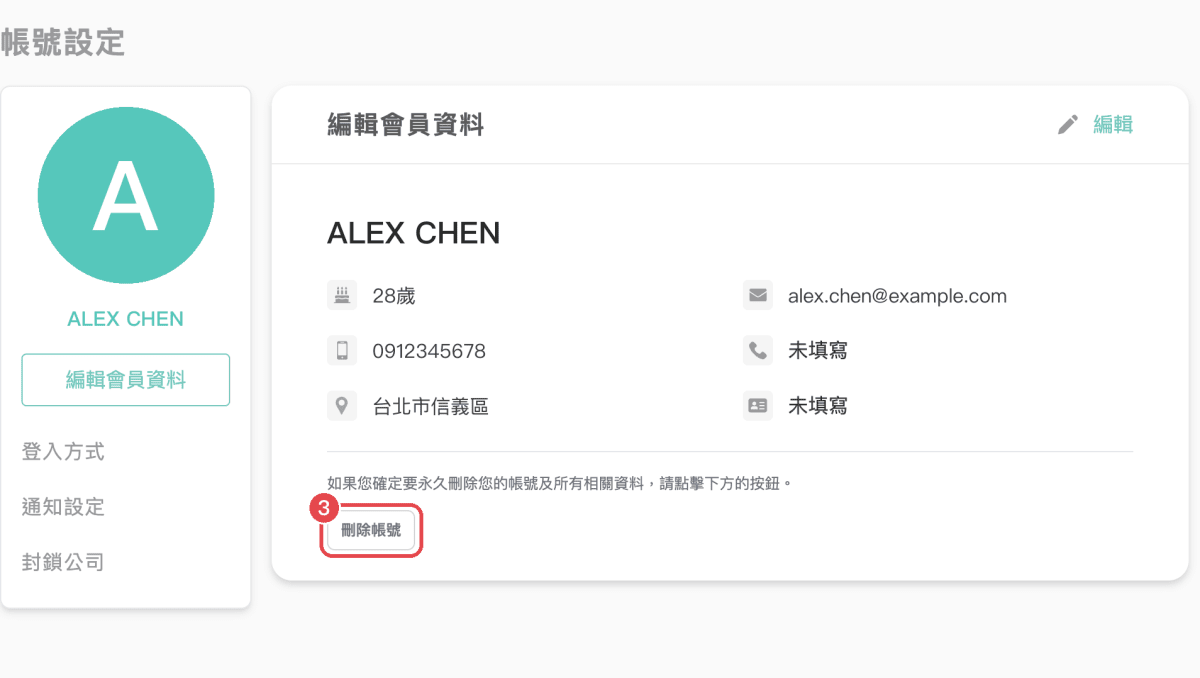
3. 在頁面下方點選「**刪除帳號**」
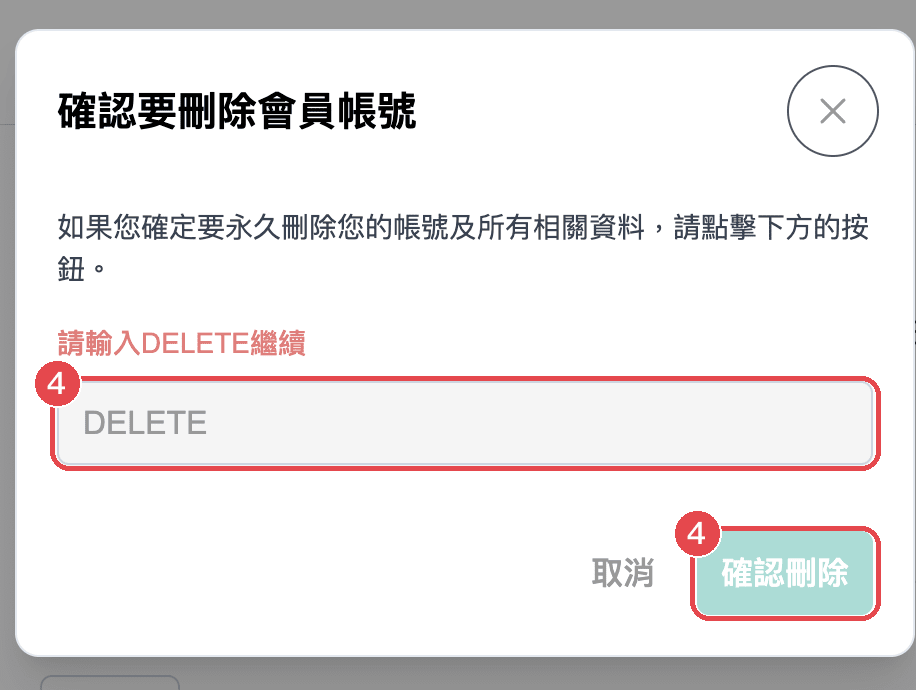
4. 輸入 `DELETE`，再按「**確認刪除**」

也可以登入後直接前往 [帳號設定頁](https://wport.me/user/account-setting)。
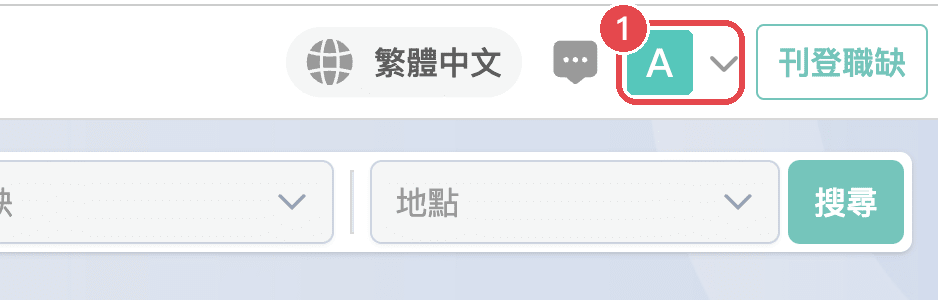
<div class="not-prose grid grid-cols-2 gap-4 my-6">
  <figure class="m-0">
    <img src="https://res.cloudinary.com/dyebbsckc/image/upload/f_auto,q_auto:good,w_1200,c_limit/wport-blog/delete-account-web-1-home.png" alt="① 點右上角的大頭照" loading="lazy" class="rounded-lg border border-slate-200" />
    <figcaption class="mt-2 text-center text-sm">① 點右上角的大頭照</figcaption>
  </figure>
  <figure class="m-0">
    <img src="https://res.cloudinary.com/dyebbsckc/image/upload/f_auto,q_auto:good,w_1200,c_limit/wport-blog/delete-account-web-2-menu.png" alt="② 選「帳號設定」" loading="lazy" class="rounded-lg border border-slate-200" />
    <figcaption class="mt-2 text-center text-sm">② 選「帳號設定」</figcaption>
  </figure>
  <figure class="m-0">
    <img src="https://res.cloudinary.com/dyebbsckc/image/upload/f_auto,q_auto:good,w_1200,c_limit/wport-blog/delete-account-web-3-account.png" alt="③ 點頁面下方的「刪除帳號」" loading="lazy" class="rounded-lg border border-slate-200" />
    <figcaption class="mt-2 text-center text-sm">③ 點頁面下方的「刪除帳號」</figcaption>
  </figure>
  <figure class="m-0">
    <img src="https://res.cloudinary.com/dyebbsckc/image/upload/f_auto,q_auto:good,w_1200,c_limit/wport-blog/delete-account-web-4-confirm.png" alt="④ 輸入 DELETE，再按「確認刪除」" loading="lazy" class="rounded-lg border border-slate-200" />
    <figcaption class="mt-2 text-center text-sm">④ 輸入 DELETE，再按「確認刪除」</figcaption>
  </figure>
</div>

## 資料如何處理

帳號刪除後，我們如何處理你的個人資料，請參考 [隱私權政策](https://wport.me/privacy-policy)。

## 需要協助？

無法登入、找不到刪除按鈕，或想請我們代為刪除帳號，請來信 [support@wport.me](mailto:support@wport.me)，並註明你註冊時使用的 Email。